
Health Data
Patient Portals Explained: Finding Yours, What They Miss, and How to Keep Everything in One Place
By JD Ramos, RN, Founder · October 28, 2026 · 7 min read
A patient portal is a secure website or app run by a provider or health system that lets you see part of your record from that organization: visit summaries, many lab results, medications, and messages with your care team. MyChart is one widely used portal product, and many health systems use it or another product under their own name. You usually need one login per organization, and each login shows only what that organization holds. This article is education, not personal medical advice; questions about what is in your record belong with your own clinician.

The short answer: what a patient portal is and how to get into yours
Most portals do the same basic job. You get an account from the clinic or hospital, you sign in on a website or phone app, and you see the information that organization chose to make available to you. Some are branded MyChart. Others carry the health system's own name, so the portal you see at one practice may look nothing like the one at the next.
I work in a cardiac cath lab, and a scene repeats often enough that I could script it. A patient is on the table or in pre-procedure, someone needs a recent lab value or the name of a medication changed last month, and the patient says, I have a portal, I just do not remember which one. Or they remember, but the password is a guess away from a lockout. Nobody is at fault. The information exists. It is just behind a door the patient cannot open at that moment.
The practical takeaway is simple: one organization, one login, one partial view. The rest of this article is about finding those logins, using them, understanding their limits, and keeping a copy of what matters somewhere you control.
How to find the portals you already have
Start with a list of every place you have been seen: primary care, specialists, hospitals, urgent care, imaging centers, labs, and your insurer. Think back a few years. Many people were enrolled in a portal at a visit and never finished setting it up.
Then search your email and text messages for words like portal, patient account, activate, or MyChart. Invitations often sit unopened. Visit paperwork and after-visit summaries frequently print portal instructions too, so check those. If you find nothing, ask the front desk or registration staff at that location for the portal name, the web address, and an activation or sign-up code.
Do not forget pharmacies and lab companies. They often run their own separate accounts for prescriptions and results, so add them to the list.
Under HIPAA, you have a right to access your own health information, and the U.S. Department of Health and Human Services explains how that works. The Office of the National Coordinator for Health IT (HealthIT.gov) also publishes public information for patients.
Keep the list in a note with the portal name, the organization, and the email address you used. Leave passwords out of that note. A password manager is the better place for credentials.
Logging in and getting set up without the usual friction

The typical steps are the same almost everywhere: receive an activation code or invitation, confirm your identity, create a username and password, and turn on two-step verification if it is offered.
The common stumbling blocks are ordinary ones. The email on file is not the one you use now. Your phone number changed. An account locked after a long period of no use. If you cannot get in, contact that organization's portal support or medical records office rather than creating a duplicate account, which can split your history in two.
Parents and caregivers should ask the records office about proxy access. Many organizations offer separate access for a child or family member, and each one sets its own process.
MedlinePlus, from the National Library of Medicine, has a plain-language overview of personal health records and why keeping your own information organized helps.
What portals show well, and what they tend to leave out
Portals do several things well: scheduling, messaging, visit summaries, many lab results, medication lists from that organization, and immunization records. For routine questions, they save phone calls.
The limit is scope. A portal reflects what one organization recorded, so care you received elsewhere typically does not appear in it. Timing varies as well. Some results post quickly and others after a review period. Some notes, images, or full reports may not appear at all and may need a separate request. And records are often something you view on screen rather than a copy you hold. Downloading is sometimes possible, but it varies by organization.
From the cath lab, the missing pieces are predictable: prior stent details, an earlier ECG, a medication change made at another practice. Those facts usually sit in a different portal than the one the patient opened. We have written before about why portals can feel dated, and that piece goes deeper on the design side: Why your patient portal feels like 2005.
When a portal is unavailable

Portals go unavailable for ordinary reasons: scheduled maintenance, a software issue, a forgotten password, a locked account, no signal, or a system that is down at an urgent moment. None of that needs a villain. The point is access. If the only copy of your results lives behind one login, you depend on that login working at the exact time you need it.
A few low-tech backups cost almost nothing. Keep a printed medication list, including doses and any supplements. Keep a photo of your most recent key results. Keep a list of your clinicians with their phone numbers. Ask each organization how to request records by phone or in person if the portal is not available.
In an emergency, clinicians will work with what they have. A current medication and allergy list helps right away, and it is one of the most useful things a patient can hand over.
Keeping a copy in one place instead of juggling logins
The idea is to stop opening five portals and keep your own organized copy that you own and can reach from your phone. We cover the habit side in Moving from portal hopping to a single source of truth.
Arxova is built for this. It can connect medical records from many hospitals, clinics, labs and insurers into one place through Fasten Connect. You can read how that works on the connect medical records page. If something is not available to connect, you can add a PDF or photo of a record by hand. You can keep a medication and supplement list with dose reminders and a log, bring in Medicare claims through CMS Blue Button, and export your own data.
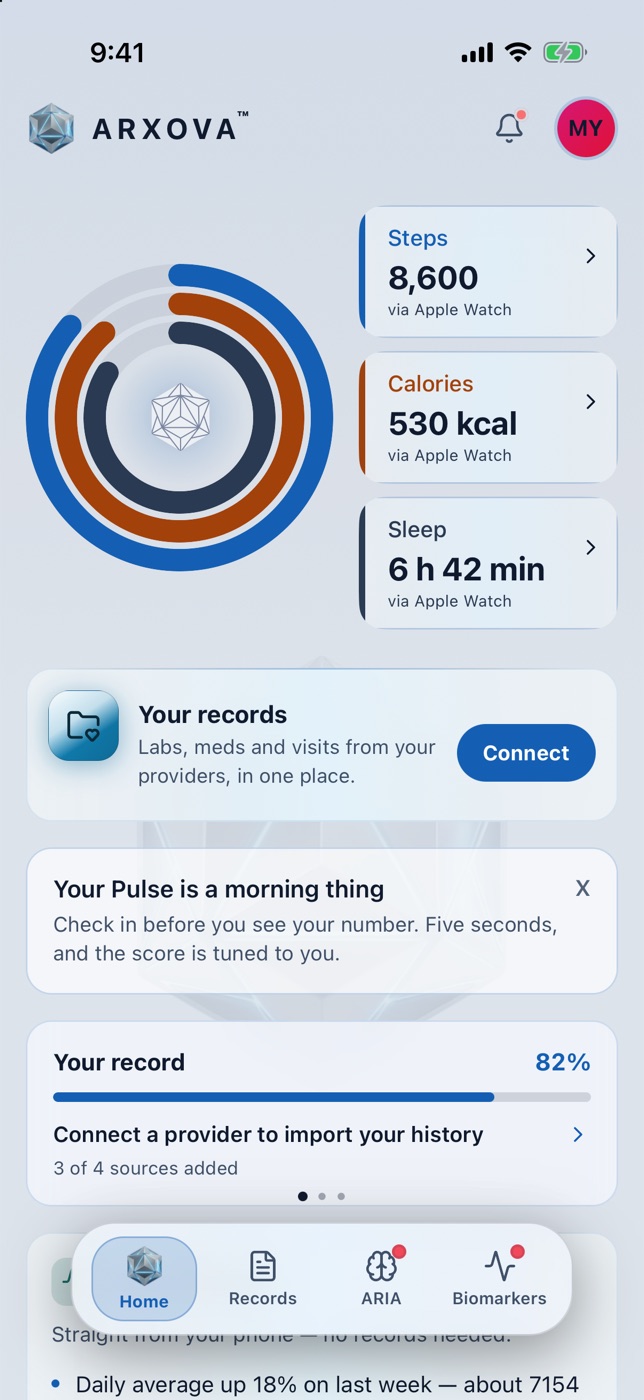
When you want someone else to see a record, you can share chosen records with a person or a clinic through a SMART Health Link and end the share at any time. The app is free, and the data belongs to you; the health data ownership page explains what that means in practice.
There is an honest limit. What appears depends on which organizations are available to connect and what they make available. So keep your portal logins too. The goal is a second copy that you control, not a replacement for the original.
A simple routine you can start this week
- List every place you have been seen, and find or request each portal.
- Log in once to each and confirm you can reach recent results and your medication list.
- Connect or upload those records into one place you control.
- Review your medication and allergy list for accuracy, and bring any questions to your clinician.
- Before any procedure or new specialist visit, make sure you can show your recent results, not just recall them.
A clear, current list takes very little time to put together, and it is much easier to do on a quiet afternoon than in a pre-procedure bay.
Start with your list this week
Then bring your records together in Arxova, so your results are in your hands when a single portal is not available.
Subscribe to The Pulse
Frequently Asked Questions
What is a patient portal and how does MyChart fit in?
A patient portal is a secure online account from a provider or health system that shows parts of your record from that organization. MyChart is one widely used portal product; some health systems use it and others use different products under their own branding.
How do I find out which patient portals I already have?
List every place you have been seen, search your email and texts for words like portal, activate or MyChart, check visit paperwork, and ask each front desk for the portal name, web address and an activation code. Do not forget pharmacy and lab accounts.
Does a patient portal show my complete medical record?
Usually not. A portal reflects what one organization recorded, so care received elsewhere typically does not appear. Some notes, images or full reports may also need a separate request.
What can I do if my patient portal is down or I cannot log in?
Contact that organization's portal support or medical records office, and ask how to request records by phone or in person. Keeping a printed medication list and a photo of recent key results gives you a backup.
Can I keep my records from different portals in one place?
Yes. Arxova can connect records from many hospitals, clinics, labs and insurers into one place through Fasten Connect, and you can add PDFs or photos by hand. What appears depends on which organizations are available to connect.
Sources
This article is for general educational purposes only and is not medical advice. Speak with your own clinician about decisions related to your care. Arxova is a health data platform that puts your records in one place you control. What appears in Arxova depends on which organizations are available to connect and what they make available.